How to Use AI on LinkedIn Without Losing Your Voice?
AI-generated text can be correct without sounding like you. Here's how to provide the right context, proofread effectively and keep your voice on LinkedIn.

A member of our team shows you in 20 minutes How can Lyter help you save 7 hours per month.



AI-generated text can be correct without sounding like you. Here's how to provide the right context, proofread effectively and keep your voice on LinkedIn.
- Last updated :
19/11/2026
Have you ever asked ChatGPT or another assistant to write a LinkedIn post, and got back clean, well-structured text… that is completely interchangeable? You're not alone. AI can speed up writing, but grammatically correct text isn't necessarily personal, or relevant to your audience.
This article focuses on one specific aspect of AI and LinkedIn writing: how to save time without losing your personality, your vocabulary or your professional credibility.
You'll find:
If you're looking for a step-by-step method to generate posts with ChatGPT or Lyter instead, we cover it in Writing a LinkedIn post that makes people react (thanks to AI). Here, we focus on what keeps your posts yours.
When you give it almost nothing, an AI tends to produce the most expected phrasing for a given topic. If thousands of people ask it the same vague question, the answers are bound to look alike. Four causes come up almost every time:
In other words, the problem rarely comes from the tool alone: it comes from the material you feed it.
Before explaining your style to an AI, you need to know how to describe it. Here are the five elements to look for in your own posts:
A simple exercise: reread your last five posts and note, for each element, what keeps coming back. This description will be the basis for everything that follows.
A general-purpose assistant doesn't learn your style on its own: it relies on what you provide in the conversation (or on the tool's personalization settings, when they exist). Here are the five levers that make the difference.
Paste three to five of your best posts, preferably on varied topics. An example beats a description: the AI picks up sentence length, punctuation, the way you open and close. Also specify what it should imitate (the rhythm, the turns of phrase) and what it shouldn't copy (anecdotes you've already told).
Complete the examples with explicit instructions: “I write casually,” “no emojis ever,” “no hashtags,” “sentences of 15 words maximum,” “I don't use the words synergy, leverage or game changer.” What you rule out is as useful as what you prefer.
Say who you are, what you sell, who you're speaking to and what your point of view is on the topic. Above all, bring the raw material: an anecdote, a real figure, an opinion, a few bullet points are enough. That material is what sets your post apart from a competitor's. If you're short on topics, our 30 LinkedIn post ideas can serve as a starting point.
“Generate meeting requests,” “provoke reactions to an opinion,” “announce something new”: the goal determines the structure and the call to action. Without one, the AI writes text that isn't aiming for anything. For the basics of hooks and structure, see our LinkedIn writing tips.
Proofreading isn't optional. AI can invent a figure, a quote or an anecdote that sounds plausible but is false, and it readily slips in phrases you'd never have written. To quickly assess whether a text is really yours, use this checklist:
How to read the result: 8 or more yes answers, the post is ready to publish. Between 5 and 7, rework the weak points. Below 5, start over from your raw material rather than correcting the text line by line.
To make the difference concrete, let's take a single topic: saying no to a client as a freelancer. The example below is fictional, written to illustrate the method: the imaginary author, Claire, is an independent recruitment consultant.
Prompt used: “Write a LinkedIn post about the importance of saying no to a client as a freelancer.”
Generated text (in French):
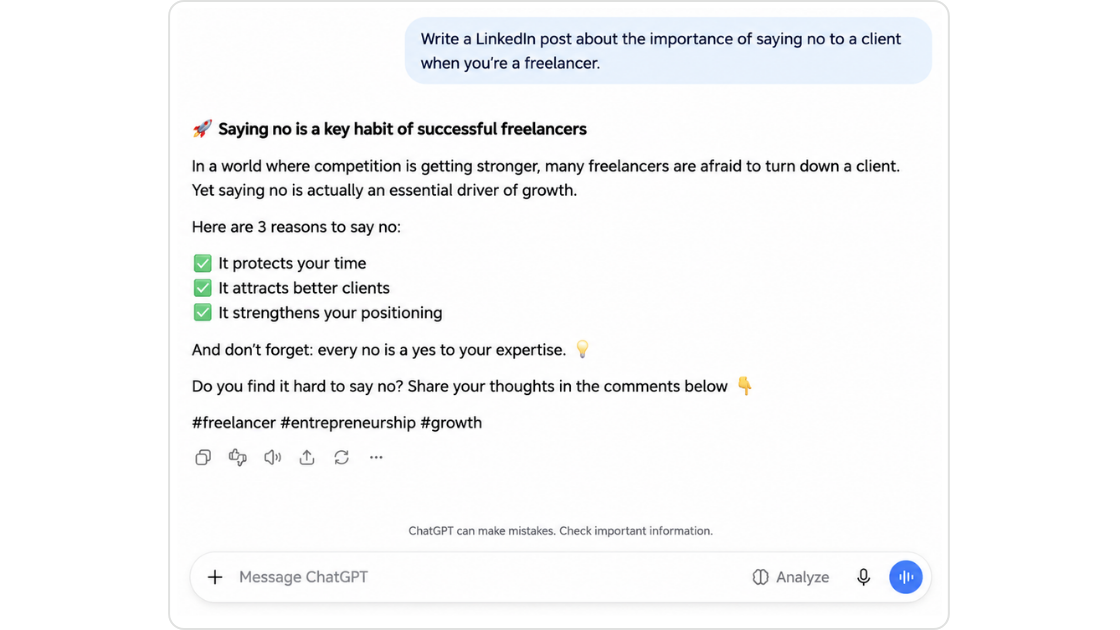
Nothing wrong with it, but nothing memorable: this text could be signed by any freelancer in any industry.
For the second version, Claire provided, in just a few bullet points:
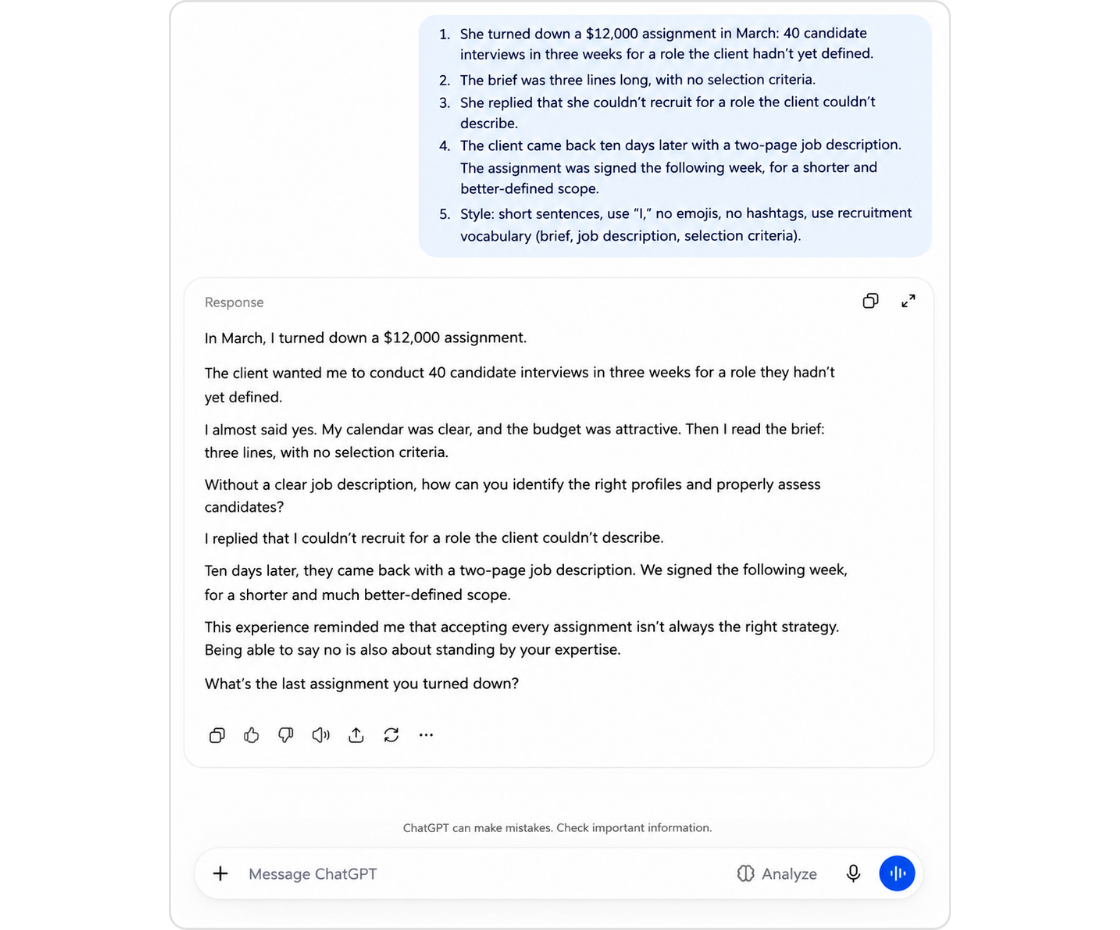
What changes: a specific fact in the very first line, a story only Claire could tell, industry vocabulary, short sentences, a conclusion that belongs only to her.
Even with good context, the first generated version almost always needs edits. Here are typical corrections to apply to your own texts:
Here is a complete prompt to copy into your usual AI assistant and keep as a reference. Replace the elements in brackets.
You are my writing assistant for LinkedIn. Your mission: write a post that sounds like me, not like an AI.
Who I am: [job, specialty, experience, type of clients].
My audience: [who reads me, what they expect, their level of knowledge of the topic].
My style: [formal or casual register, tone, average sentence length, usual structure, use of emojis and hashtags].
Words and phrases I use: [list]. Ones I never use: [list].
Examples of my posts (imitate the rhythm and tone, don't copy the anecdotes): [paste 3 to 5 posts here]
Goal of the post: [e.g., provoke reactions, get meeting requests, announce an offer].
Topic: [topic of the post].
My raw material: [a lived anecdote, a real figure, an opinion, as a few bullet points].
Constraints: [length, format, desired call to action].
Rules: don't invent any figure, quote or anecdote. If you're missing information, ask me your questions before writing. Avoid generic openings such as “In a world where…”.
Deliverable: two versions of the post, then the list of everything I need to verify before publishing.
To adapt it:
A general-purpose assistant (ChatGPT, Claude, etc.) and a specialized LinkedIn tool don't meet the same need. Neither is systematically better: it all depends on your posting rhythm and how much time you want to spend on preparation.
In practice: if you post rarely and enjoy refining your prompts, a well-briefed general-purpose assistant is enough. If you post regularly and want to avoid re-explaining who you are every time, a specialized tool saves time.
Lyter is a tool built for LinkedIn publishing. When it comes to style, here is what it concretely offers:
You can check it for yourself, with the same protocol as in Claire's example: choose a topic you know well, give Lyter a few bullet points of raw material, then run the result through the checklist above. The test is free, and proofreading stays on your side: no tool replaces your own eye on text signed with your name.
Find out how to create LinkedIn posts closer to your style with Lyter.

In part. With good examples of your posts, a clear description of your tone and explicit things to avoid, it gets noticeably closer. But it remains dependent on what you give it and can drift toward generic phrasing: proofreading is still necessary.
Always bring material only you have: an anecdote, a real figure, a strong opinion. Avoid one-line prompts, rule out stock phrases and run the text through the checklist before publishing.
Yes. AI can invent figures or facts, use a tone that isn't yours or miss an important nuance. It's your name and your credibility on the line.
Three to five of your best recent posts, on varied topics, plus a list of words you use and words you avoid. If you have posts you consider failures, say so: the AI will know what not to imitate.
In just 20 minutes, our team will show you how Lyter can free up 7 hours/month.